




Wind Speed Widget: How to Add Live Wind Data to Your Site


Looking for a simple way to display live weather conditions on your website? A wind speed widget helps visitors track real-time wind updates directly from your page while improving engagement and usability. In this guide, you’ll learn what a wind speed widget is, why it matters, and how to quickly embed the Weather365 widget on your website today.
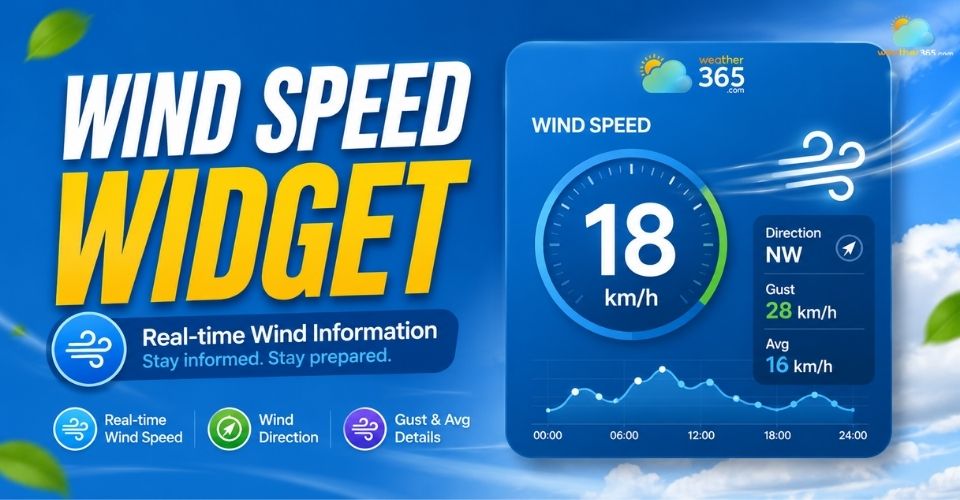
Wind speed widget
What is a wind speed widget?
A wind speed widget is a small weather tool that displays live wind conditions directly on a website. It helps visitors quickly check current wind speed, direction, and local weather updates without leaving the page.
You’ll often see a wind speed widget on outdoor activity websites, travel blogs, marine platforms, weather pages, or local news sites where real-time weather information matters.
For example, travelers planning outdoor activities can check California weather conditions before heading outdoors, while coastal visitors may want to monitor changing winds in Florida or other weather-sensitive destinations.
Depending on the provider, the widget may also show extra details like temperature, humidity, forecasts, or wind gust levels.
The biggest advantage of using this type of widget is convenience.
Instead of asking users to open another weather app or search manually, your website delivers useful weather data instantly in one place.
How a wind speed widget works
A wind speed widget works by connecting to live weather data sources through an API or cloud-based weather system.
These systems collect information from satellites, radar networks, airport weather stations, and forecasting models around the world.
Once the widget is embedded into your website, it automatically updates weather conditions in real time. Pulling data dynamically like a temperature widget and calculating moisture via a humidity widget. Most widgets can display:
Current wind speed
Wind direction
Wind gusts
Local temperature
Weather conditions
Hourly or daily forecasts
Many modern widgets are also responsive, meaning they automatically adapt to mobile phones, tablets, and desktop screens.
Some advanced providers even allow visitors to switch locations, save favorite cities, or view extended forecasts.
This is particularly useful when comparing conditions across different regions, such as checking Texas weather forecasts before a road trip or monitoring Colorado weather before hiking and other outdoor activities.
This makes the widget more interactive and useful for users who regularly monitor outdoor conditions.
For website owners, setup is usually simple.
Most providers of weather widgets for websites generate an embed code that you can paste into platforms like WordPress, Wix, Google Sites, or custom HTML websites in just a few minutes.
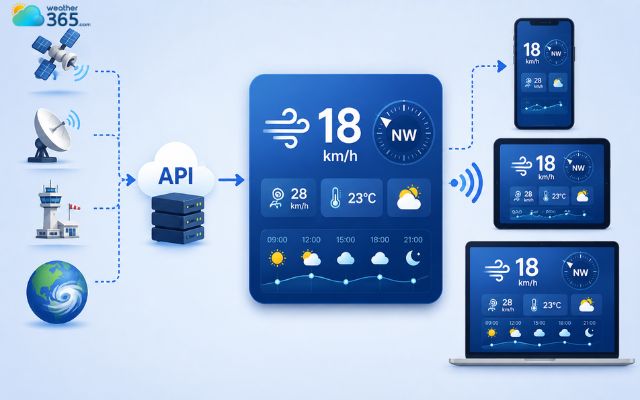
A wind speed weather widget connects to weather data through an API
Why using a wind speed widget?
A wind speed widget makes your website more useful by giving visitors instant access to live wind and weather conditions.
It helps improve engagement, adds local relevance, and provides practical value for everyday planning.
Enhanced user engagement
Because weather data updates in real time, visitors are more likely to stay longer on your website and check conditions multiple times throughout the day.
This can help increase interaction and reduce bounce rates.
Specialized audience targeting
A wind speed widget is especially helpful for outdoor-focused audiences like cyclists, boaters, kiteboarders, golfers, and drone operators.
Wind monitoring is vital for windy plains, where users frequently check Kansas weather conditions for sudden gusts.
Providing live wind data helps attract niche traffic and encourages repeat visits.
For athletes and outdoor workers, tracking wind isn't enough; combining it with a heat index widget helps them monitor safe operational thresholds during extreme heat.
Localized context
Adding local wind conditions gives more depth to travel, news, tourism, or real estate websites.
Visitors can quickly understand the weather situation in a specific area before making plans.
Related articles:
Improved site utility
A wind speed widget delivers quick, at-a-glance weather information directly on your website.
This convenience helps position your site as a reliable resource users can return to regularly.

Wind speed widget makes your website more useful
About Weather365 widget
Weather365 is a customizable weather widget platform that helps websites display live weather data in a clean, responsive, and user-friendly format.
It’s designed for blogs, business websites, travel pages, outdoor platforms, and anyone who wants to add real-time weather updates without complicated setup.
The platform combines accurate weather tracking with flexible design options, making it easy to match the widget to your website layout and audience needs.
Features of a Weather365 widget
Real-Time Data Updates
Weather365 continuously updates weather information automatically to provide accurate and reliable conditions in real time.
Visitors can instantly check current wind, temperature, or forecast data directly from your site.
Multi-Location Tracking
Users can monitor weather conditions for their current GPS location or save favorite cities around the world.
This feature is especially useful for travelers, outdoor enthusiasts, and global businesses.
Highly Customizable Interface
The widget offers multiple layouts, sizes, and display styles to fit different website designs.
You can also customize transparency, choose weather icon sets, and optimize the widget for desktop or mobile screens.
Comprehensive Metrics Display
Weather365 displays important weather details at a glance, including current temperature, daily highs and lows, humidity, and so on…
Weather status like sunny, rainy, or stormy
This helps visitors quickly understand local conditions without leaving your website.
Users can also explore location-specific forecasts, such as New York weather, when they need more detailed information for a particular area.
Extended Forecasts
The platform also supports detailed forecast views, including 3-day weather widget, 5-day weather widget, and 7-day weather widget outlooks.
Some layouts even include visual weather graphs for easier tracking and planning.
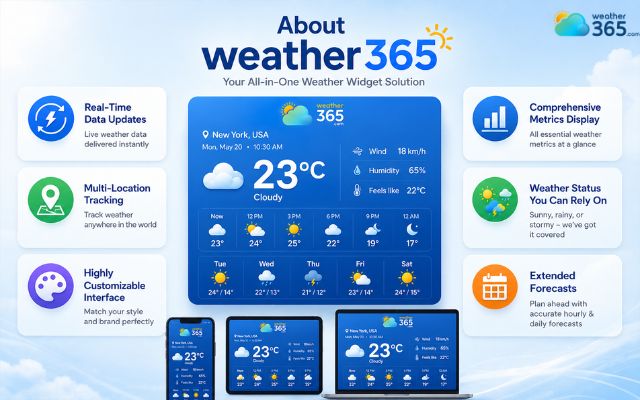
Crucial features of a wind speed widget
How to add a wind speed widget to your site?
It’s time to make your website more interactive!
Most modern weather widget platforms provide ready-to-use embed code, so you can display live wind data on your site in just a few minutes without advanced coding skills.
Step 1: Choose a widget provider
The first step is selecting a reliable weather widget provider like Weather365.
A good platform should offer accurate real-time weather updates, responsive designs, and flexible customization options so the widget fits naturally into your website layout.
Weather365 is popular because it supports multiple widget styles and works smoothly across desktop and mobile devices.
Step 2: Customize and copy the code
Once you choose your widget, you can customize its appearance to match your website.
Most providers allow you to adjust the size, layout, colors, weather metrics, and even background transparency.
You can also configure the widget for specific locations, whether you want to display the Texas weather forecast or check Alabama 7-day weather forecast.
After finishing the setup, the platform automatically generates an embed code. Simply copy this code before moving to the next step.
Step 3: Paste code into your website builder
Now it’s time to add the widget to your website. The process may vary slightly depending on your platform, but it’s usually very simple.
For WordPress websites, you can add an “HTML” or “Custom HTML” block and paste the widget code directly into the page or sidebar area.
If you use Wix, go to “Embed Code,” choose “Embed HTML,” then paste your weather widget snippet into the box provided.
On Google Sites, click the “Embed” button from the right-side panel, select “Embed Code,” and insert the copied code.
For custom HTML or CSS websites, simply paste the snippet into the section of your HTML file where you want the wind speed widget to appear.
After publishing your site, the widget will automatically begin showing live wind and weather updates for visitors in real time.
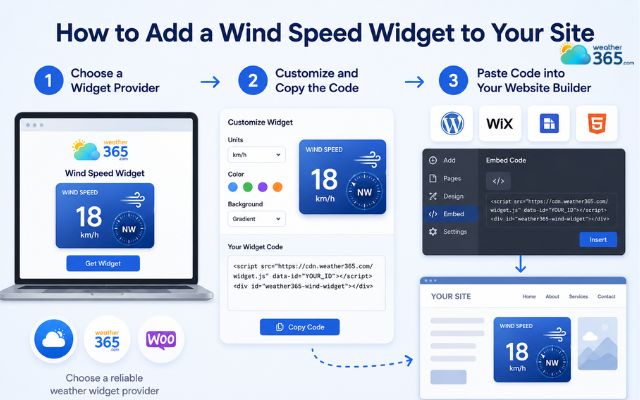
Easy steps to embed the Weather365 widget on a site
Sum up
Now that you know how simple it is, have you successfully added a wind speed widget to your site yet? It is the ultimate way to keep your readers engaged and informed. Give platforms like Weather365 a try today, and watch your outdoor-loving community thank you for the real-time updates!
Frequently Asked Questions (FAQs)
Step 1: Choose a weather widget provider
Step 2: Customize the widget appearance
Step 3: Copy the embed code
Step 4: Paste it into your website builder or HTML page
Step 5: Publish your site
The widget will then display live wind conditions automatically.
Related post

The Ultimate Temperature Widget Guide to Boost Site’s Engagement
 224
224
 0
0
 4.7
4.7
 11/08/2026

Humidity Widget: Real-Time Moisture Tracking for Sites
217
0
4.8
17/08/2026

Heat Index Widget: Why Your Website Needs Real-Feel Weather Data?
204
0
4.7
14/08/2026

0 Comment
Leave a comment
Your email address will not be published. Required fields are marked *