




Humidity Widget: Real-Time Moisture Tracking for Sites


Looking for a simple way to keep visitors informed and engaged? A humidity widget delivers real-time moisture updates directly on your website while improving user experience across mobile and desktop devices. Dive in to discover the key benefits, must-have features, and how to embed a fully responsive humidity widget in just minutes.

Humidity widget
What is a humidity widget?
A humidity widget is a small, embeddable software application that displays live atmospheric moisture data on a webpage. It is one of the many specialized weather widgets for websites available today.
It works by connecting to external weather APIs (Application Programming Interfaces) or meteorological networks via a lightweight script.
When a user loads your page, the widget fetches the most recent local weather data and renders it visually without requiring a full page reload.
To see how temperature and moisture interact to create these humidity readings, you can test different conditions in the interactive tool below.
Core Features:
Real-Time Data Syncing: Continuous updates to ensure precision and accuracy throughout the day.
Responsive & Customizable Design: Adapts automatically to mobile or desktop screens and blends with any site layout or color scheme.
Geo-Location Detection: Automatically displays data based on the visitor's current IP address or GPS location, alongside a manual search bar.
Multi-Metric Display: Often pairs relative humidity with dew point, ambient temperature, and general comfort level indicators.
Tracking moisture levels is simple with dedicated blocks like the Florida humidity index tracker.
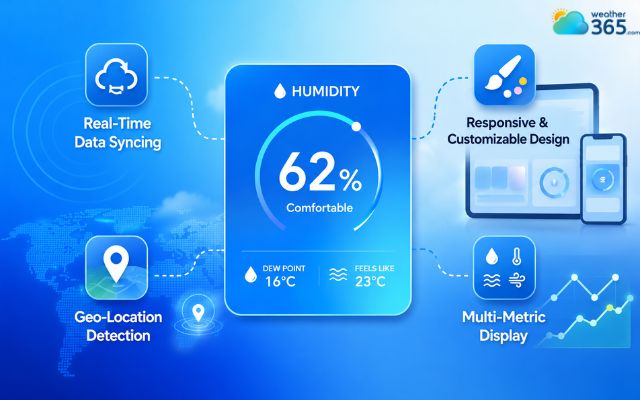
Core features of a humidity widget
Benefits of using a humidity widget
A humidity widget does more than improve appearance. It also adds practical value that keeps users engaged and informed.
Optimizes health & comfort
Humidity directly affects indoor comfort and personal health. Excess moisture can encourage mold growth and dust mites, while dry air may lead to irritated skin, dry eyes, or respiratory discomfort.
A humidity widget helps users monitor conditions and maintain a healthier environment more easily.
For smart home websites or wellness platforms, this information can become a highly useful daily feature.

A humidity widget helps users monitor conditions
Protects your home & valuables
Unbalanced humidity levels can damage furniture, wood flooring, wallpaper, musical instruments, books, and electronics over time.
By displaying humidity levels in real time, a widget helps users detect unsafe conditions early and take preventive action before costly damage occurs.
This is particularly useful for home improvement, interior design, and property management websites.

A humidity widget helps users detect unsafe conditions
Saves on energy bills
Humidity plays a major role in how hot or cold a room feels. When humidity levels rise, people often overuse air conditioners or dehumidifiers unnecessarily.
A humidity widget allows users to make smarter decisions about climate control systems and reduce excessive energy consumption.
Over time, this can help lower electricity costs while maintaining better indoor comfort.

A humidity widget allows users to make smarter decisions
Streamlines daily planning
Humidity can significantly affect outdoor activities and daily comfort. Heavy, humid air often feels hotter and more exhausting than the actual temperature.
While a temperature widget shows the raw air temperature, a humidity widget measures the moisture in the air, which directly impacts the real-feel comfort level.
To track how moisture amplifies heat perception, websites often combine this with a heat index widget.
With a humidity widget, users can quickly decide:
What clothing to wear
Whether to exercise outdoors
When to schedule outdoor activities
How comfortable weather conditions may feel
This simple feature improves convenience and adds practical value for everyday visitors.
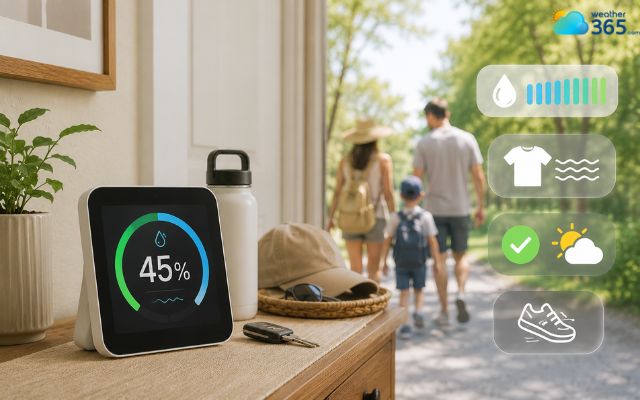
A humidity widget keeps users engaged and informed
Why use the Weather365 widget?
Weather365 offers a modern humidity widget designed for speed, customization, and reliable real-time performance.
Ultra-Lightweight & Fast
The Weather365 widget uses optimized asynchronous loading technology that integrates smoothly into websites without slowing page speed.
Because the code is lightweight, it helps maintain strong Core Web Vitals performance while still delivering live weather updates.
This makes it suitable for both small blogs and large commercial websites.
For example, a travel website can provide quick access to Arizona weather conditions without overwhelming the page with unnecessary elements.
100% Responsive Design
The widget automatically adapts to every screen size and orientation.
Whether users browse from mobile devices, tablets, widescreen monitors, or vertical displays, the humidity widget maintains a clean and professional appearance.
Responsive behavior also improves user experience and mobile SEO performance.
Zero-Code Customization
Weather365 includes an intuitive visual builder that allows website owners to customize the widget without coding knowledge.
You can quickly adjust the layout model, widget size, the number of forecast days, the temperature/precipitation unit (which seamlessly pairs if you are also running a rainfall widget), date format, and so on,...
This allows the humidity widget to perfectly match your website branding in just a few clicks.
For websites focused on agriculture or outdoor activities, the widget can be configured alongside location-specific information such as Kansas weather forecasts.
Smart Geo-Targeting
The widget can automatically detect a visitor’s location and display highly localized humidity data instantly.
This personalized experience helps increase engagement while making the weather information more relevant for each visitor.
Geo-targeting is especially useful for travel websites, tourism businesses, and local service platforms.
Reliable Data Infrastructure
Weather365 is powered by stable meteorological systems designed to provide accurate real-time weather updates with strong uptime reliability.
Consistent performance is critical for websites that depend on live environmental information, especially during rapidly changing weather conditions.
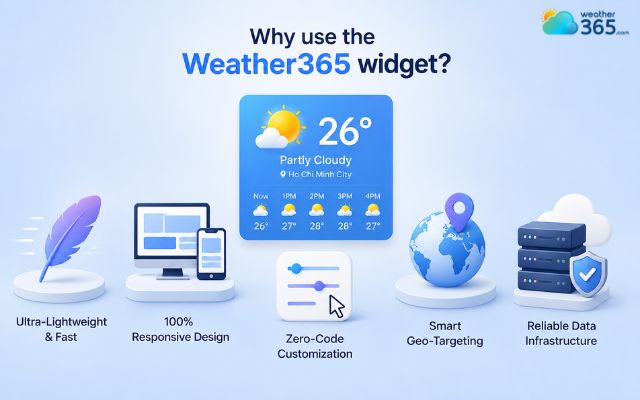
Weather365 is the most well-known weather widget provider
How to add a humidity weather widget to your site?
Adding a humidity widget to a site is surprisingly easy! Just follow the steps below, and you’ll get one in minutes!
Step 1: Customize Your Layout
Navigate to the visual builder on Weather365 widget and select your preferred layout style, color palettes, dimensions, and baseline metrics.
Step 2: Generate the Embed Code
Click the build button to generate your unique, pre-formatted iframe or JavaScript snippet containing your custom configurations.
Step 3: Paste into Your CMS
Open your website builder or content management system:
WordPress: Open your page editor, add a Custom HTML block, and paste your code directly into the field.
Wix: Open the Wix Editor, go to Add Elements > Embed Code > Embed HTML, click Enter Code, and paste your snippet.
Custom HTML: Open your source file and paste the iframe or JavaScript code exactly where you want the widget to render on the page.
Step 4: Go Live & Test
Publish your changes. Open the live page on both desktop and mobile web browsers to verify that the design scales down responsively and loads correctly.

Easily add a weather widget to your site
Sum up
Integrating a dynamic humidity widget is a quick, high-reward upgrade for any site focused on weather, local lifestyle, property maintenance, or health. By utilizing lightweight, hyper-local solutions like Weather365, you provide actionable environmental insights to your visitors while keeping your site fast, responsive, and beautifully branded.
For websites catering to outdoor sports, aviation, or maritime activities, pairing this tool with a live wind speed widget creates a comprehensive weather dashboard that displays both moisture levels and air dynamics in real time.
Frequently Asked Questions (FAQs)
Related post

Rainfall Widget: Your Ultimate Guide to Live Precipitation Tracking
 332
332
 0
0
 4.7
4.7
 16/06/2026

Wind Speed Widget: How to Add Live Wind Data to Your Site
240
0
4.9
26/08/2026

The Ultimate Temperature Widget Guide to Boost Site’s Engagement
224
0
4.7
11/08/2026

0 Comment
Leave a comment
Your email address will not be published. Required fields are marked *