




Best Wind Chill Widgets for Your Website (Free & Embeddable)


Ever wonder why a freezing day suddenly feels dangerously colder? The secret lies in a wind chill widget - the ultimate tool for unlocking real-time "feels like" temperatures. Dive in to discover how this simple, free addition can instantly elevate your website's utility, protect your audience, and master winter weather tracking today!

Understanding wind chill widget
What is Wind Chill Widget?
A wind chill widget is a compact, embeddable web element or mini-application that displays the "feels like" temperature.
Rather than just showing the ambient air temperature, it uses a calculated index combining current air temperature and wind speed to show how cold the air actually feels on human skin.
If you are looking to track other invisible atmospheric factors that impact comfort, such as moisture and humidity, pairing this with a dedicated dew point widget can give your users a complete environmental breakdown.
Why is the temperature alone not enough?
During the colder months, wind accelerates heat loss from the body.
A calm day at 30°F (-1°C) feels vastly different from a day at 30°F with 25 mph sweeping winds, which can drop the wind chill factor into the dangerous single digits.
Integrating a dedicated wind chill metric into your digital platform is highly beneficial for several industries:
Ski Resorts & Winter Lodges: Keeps visitors informed about mountain safety and gear requirements.
Education & Local Government: Empowers school officials and guardians to safely evaluate outdoor activities, recess schedules, or potential morning delays.
Adventure & Travel Platforms: Equips outdoor enthusiasts, including backpackers, trail runners, and campers with critical survival and preparation data.
Regional News Outlets: Elevates community journalism by integrating highly accurate, live environmental data into daily weather reporting.
Wind chill factors drastically alter how cold it feels, an essential metric on Alaska current weather reports.
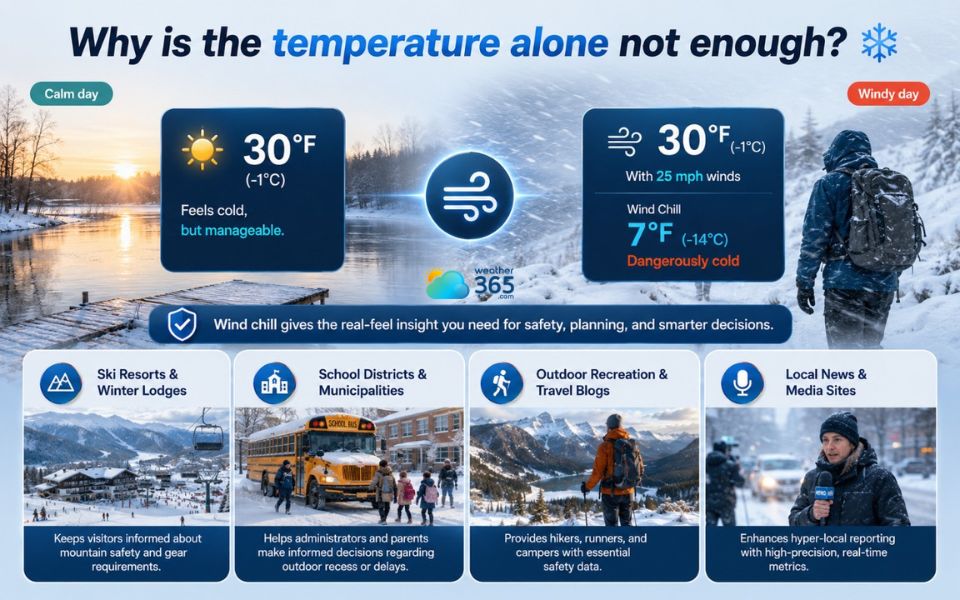
Wind chill data is important to some industries
Key Features to Look For in a Weather Widget
Before selecting a widget provider, ensure the tool includes these essential technical and design features:
Mobile Responsiveness:
The widget must scale fluidly across all devices, maintaining readability on smartphones, tablets, and desktop setups.
Real-Time Data Refresh:
Wind speeds fluctuate rapidly.
By integrating a premium real-time weather widget, you guarantee that your "feels like" data updates on the fly, never falling behind rapid atmospheric changes.
Location-Aware Features:
Maximizing user engagement means providing flexibility.
Look for solutions that seamlessly pinpoint a visitor's location on their own, while still providing the freedom to manually input a specific municipality or postal code for hyper-local tracking.
For example, users can check the Texas weather forecast, Alabama 3 day forecast, Hawaii 5-day weather forecast, or New York 7-day weather prediction based on their location and travel needs.
Visual Styling & Interface Controls:
It is essential that the tool complements your website's overall look and feel perfectly.
It should offer clean design controls, including seamless switching between Dark Mode and Light Mode to match your website's branding.
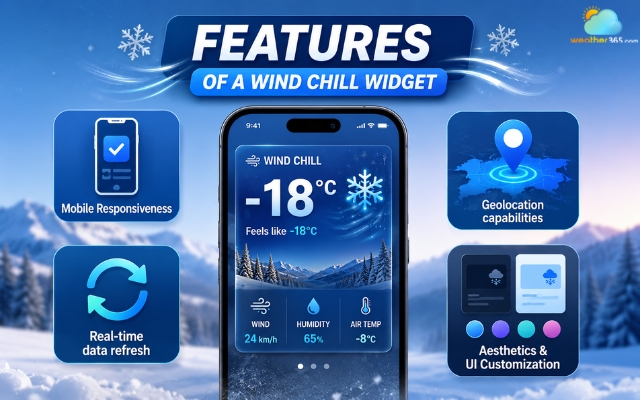
Several important features of a wind chill widget
Top Free Wind Chill Widgets for Websites (Updated)
While many generic weather widgets only show standard temperatures, selecting a tool that accurately handles the dynamics of wind chill is crucial for localized, winter-sensitive sites.
Here are the three best options available today, with a deep dive into the most comprehensive data platform on the market.
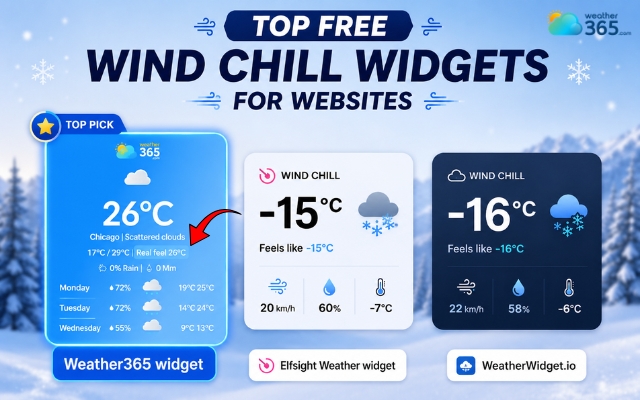
Best wind chill widgets
Weather365 widget
Weather365 is a premier data platform built for developers, webmasters, and weather enthusiasts who require deep meteorological accuracy.
Unlike basic templates, it offers high-precision wind chill calculations alongside comprehensive atmospheric modeling.
The platform also provides localized weather forecasts across the US, allowing users to explore locations such as California weather forecast, Florida weather forecast, Colorado weather forecast, and Arizona weather forecast.
It is completely ad-free and ideal for sites needing clean, professional integrations.
Elfsight Weather Widget
Elfsight offers a highly polished, modern UI with an array of pre-made templates. It tracks standard "apparent temperature" beautifully and is incredibly easy to set up.
However, its free tier comes with strict monthly view limits and includes platform branding.
WeatherWidget.io
A popular, long-standing free choice for webmasters. WeatherWidget.io is a reliable, lightweight, and completely free solution.
It offers basic CSS toggles and flat layouts that blend easily into headers or sidebars, though it lacks the advanced technical data depth of dedicated meteorological tools.
Features | Weather365 | Elfsight Weather | WeatherWidget.io |
Wind Chill / "Feels Like" | Excellent (High-Precision) | Good (Standard Apparent) | Standard |
Cost | Free Widget Configurator | Free Tier (With View Limits) | Free |
Technical Data Depth | High (Wind, Pressure, Vectors) | Medium | Basic |
Design Control | Advanced Styling Interface | Pre-made Modern Templates | Basic CSS Toggles |
Ad/Branding Free? | Yes | No (Branded on Free Tier) | Yes |
If you need to display extended outlooks alongside current wind patterns, consider checking out our guide on the best Forecast Range Widgets to help your audience plan their week ahead
How to Embed a Wind Chill Widget on Your Website
Adding a responsive weather element to your site takes only a few minutes. Here is how to do it using the most well-known provider - Weather365 as a configuration example:
Step 1: Customize Your Widget
Navigate to the provider's widget configurator. Have you not found one? Try the Weather365 widget!
Select your target location (or enable auto-location tracking), choose your units (Fahrenheit/mph or Celsius/kmh), and adjust the layout dimensions to fit your site's sidebar, header, or footer.
Step 2: Generate the Code
Once you are satisfied with the visual style and data layout, click Generate Code. The platform will output a snippet of clean HTML or an iframe code block. Copy this text to your clipboard.
Step 3: Paste into Your CMS
Open your website's backend or content management system (CMS) and paste the code into the desired location:
Weather Widget for WordPress: Add a "Custom HTML" block to any page, post, or widget area.
Weather Widget for Wix or Squarespace: Simply locate the site builder's native "HTML Component" or "Embed Code" blocks to insert your snippet.
Raw HTML: Paste the snippet directly into your index or sidebar template file where you want it to render.
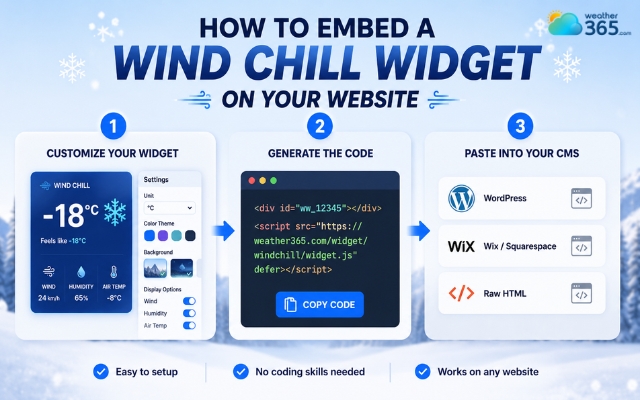
Easily add a wind chill widget to your website
Final Words
Providing real-time wind chill data by a wind chill widget improves user engagement and offers critical safety utility to your audience during severe winter weather. For absolute precision and ad-free design control, platforms like Weather365 provide the ideal balance of advanced meteorological depth and modern aesthetics.
Frequently Asked Questions (FAQs)
Related post
Hourly Weather Widget: Stay Updated With Real-Time Local Forecasts
 243
243
 0
0
 4.8
4.8
 20/08/2026

What is Dew Point Widget? Tracking Real-Time Comfort & Moisture
234
0
5.0
14/08/2026
Real-time Weather Widget: Definition, Features, and Setup
217
0
5.0
19/05/2026

0 Comment
Leave a comment
Your email address will not be published. Required fields are marked *