




What is Dew Point Widget? Tracking Real-Time Comfort & Moisture


Ever wondered why a warm day feels incredibly sticky while another feels perfectly crisp? The secret lies in a dew point widget, your ultimate tool for decoding real-time comfort. Dive into this guide to discover how this smart tracker exposes true humidity and changes how you read the weather forever!
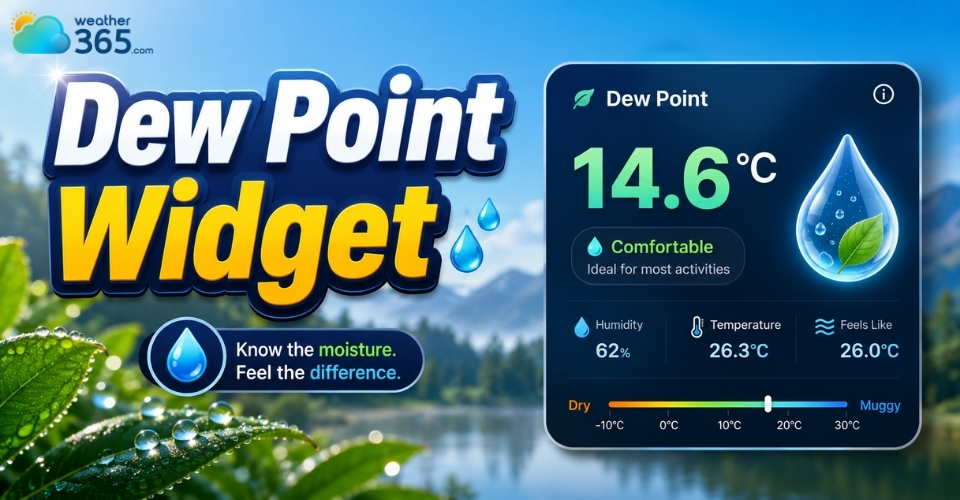
Dew point widget
What is the dew point widget?
A dew point widget is a compact, digital tool found on smartphones, desktops, and websites that displays the exact temperature at which air becomes saturated with moisture and dew begins to form.
Unlike standard current weather widget that only show the actual temperature, a dew point widget isolates atmospheric moisture.
It serves as your ultimate digital shortcut to understanding the true humidity levels of your environment at a single glance.
Why Dew Point Matters?
Many people rely on relative humidity to judge comfort, but relative humidity is deceptive because it changes based on the air temperature.
Dew point is a better measure of comfort than humidity alone, especially in coastal regions like Louisiana humidity and weather.
As the air warms up, its capacity to hold water increases, causing the relative humidity percentage to drop even if the amount of moisture in the air stays exactly the same.
The dew point is an absolute measure. It tells you exactly how much water vapor is in the air.
Below 55°F (13°C): Dry and comfortable.
56°F to 65°F (13°C to 18°C): Sticky or noticeable moisture.
Above 65°F (18°C): Muggy, oppressive, and tropical.
By tracking the dew point, you can accurately plan outdoor workouts, manage indoor HVAC settings, or simply brace yourself for a bad hair day.
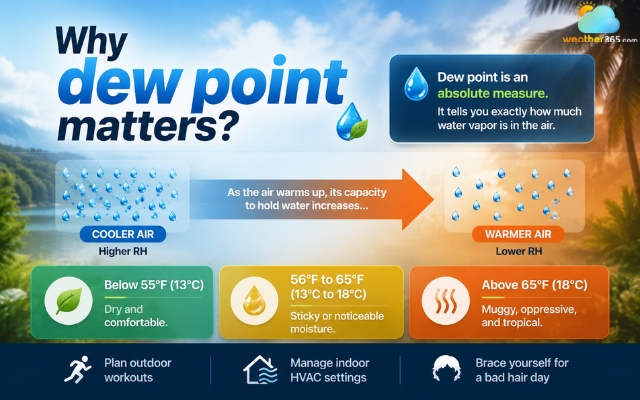
The dew point widget is to understand true humidity levels
Features of the dew point widget
A high-quality dew point widget does much more than display a single number.
Modern widgets come packed with features to help you visualize and understand atmospheric moisture:
Real-Time Data Monitoring: It displays the current dew point temperature, usually side-by-side with the "Feels Like" index, actual air temperature, and relative humidity for a complete weather profile.
Gauge of Comfort Level: Many widgets include color-coded alerts or text descriptors (e.g., "Pleasant," "Sticky," or "Oppressive") so you can instantly gauge your comfort level without analyzing the raw numbers.
Trend Tracking & Graphs: Moisture levels fluctuate throughout the day. Advanced widgets offer hourly or daily graphs, allowing you to see if the air is drying out or getting stickier as the day progresses.
Customization & Styling: You can easily tailor the widget to match your personal aesthetic. Options include scaling layouts (from a tiny 1x1 app icon to a full-screen layout), toggling light/dark themes, and switching between Celsius and Fahrenheit.
Predictive Indicators: Advanced algorithms forecast sudden drops or spikes in moisture, helping you predict evening fog, impending rainstorms, or drastic overnight temperature drops.
Specialized Calculations: For tech-savvy users or meteorology enthusiasts, some widgets can calculate secondary metrics like the heat index or frost point directly from the live data.
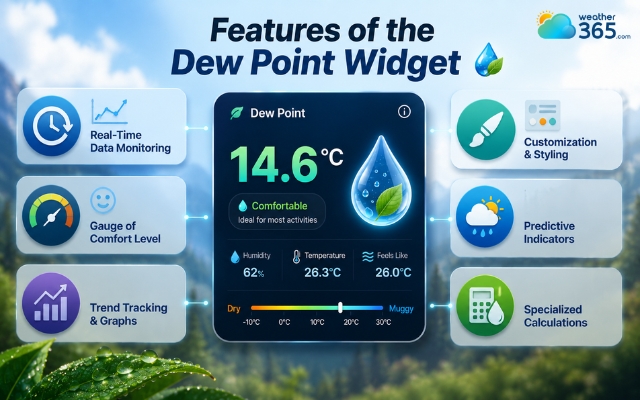
Features of the dew point widget help you visualize and understand
Why Outdoor Enthusiasts and Professionals Rely on a Dew Point Widget
While casual observers check the daily high temperature to pick an outfit, athletes and industry experts know that temperature only tells half the story.
The real dictator of environmental comfort and safety is moisture.
By condensing complex atmospheric data into an instant, glanceable readout, a dew point widget has become an essential tool for specialized decision-making.
Here is how different sectors rely on this precise metric to optimize their daily operations:
Endurance Athletes & Coaches
For runners, cyclists, and triathletes, a high dew point is a performance killer.
When the dew point climbs above 65°F (18°C), the air is too saturated for sweat to evaporate efficiently, straining the body's cooling mechanism.
Conversely, when winter training begins, sports scientists switch gears to monitor a wind chill widget to protect athletes against frostbite and hypothermia.
Using these precise moisture and wind tools allows coaches to adapt pacing, scale hydration strategies, or shift grueling workouts to the safest hours of the day.
HVAC Technicians & Smart Home Integrators
Relative humidity changes wildly as indoor temperatures fluctuate, making it an unstable metric for climate control.
Professionals rely on dew point values to configure smart thermostats and industrial dehumidifiers.
Managing the actual moisture content prevents mold growth, protects structural wood, and optimizes energy efficiency.
For regions with significant seasonal humidity changes, monitoring Alabama weather conditions can also provide useful context when evaluating outdoor moisture levels.
Photographers & Stargazers
For night-sky astronomers and landscape photographers, clear vision is everything.
When the ambient temperature drops to meet the dew point, condensation instantly forms on expensive camera lenses and telescope mirrors.
Monitoring the shrinking gap between temperature and dew point via a widget allows them to predict exact fog windows and deploy lens heaters before equipment ruins the shot.
Agriculturalists & Gardeners
Farmers and viticulturists track evening dew points to predict damaging ground frost.
If the evening dew point is below freezing (32°F/0°C), a sudden drop in nighttime temperature guarantees frost formation, signaling that it is time to cover delicate crops or activate orchard fans.
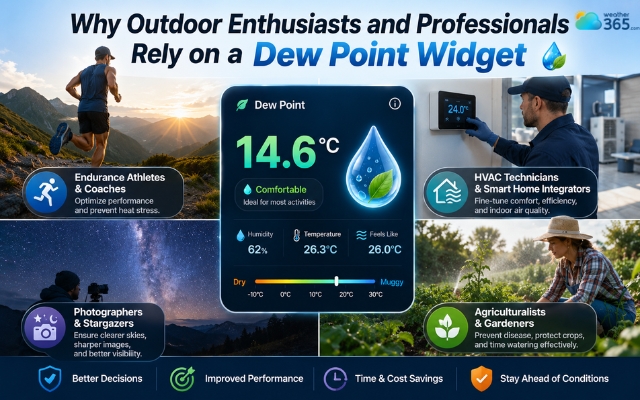
Dew point widget is an essential tool for specialized decision-making
How to find dew point in widgets?
Whether you are a casual weather watcher or a web developer looking to enhance your site, finding or implementing a dew point widget is straightforward.
1. If You Are Viewing/Using a Mobile or Desktop Weather Widget
If you already have a standard weather app widget on your phone's home screen, the dew point data is usually just a tap away:
Expand the Widget: Click or tap on your home screen widget to launch the full weather application.
Check Settings/Graphs: Scroll down past the main temperature to the details section, or toggle the graph view to switch from "Rain" or "Temperature" to "Dew Point."
Reliable Weather Providers: National meteorological services and premium weather apps explicitly map out dew point trends directly underneath their hourly forecast charts.
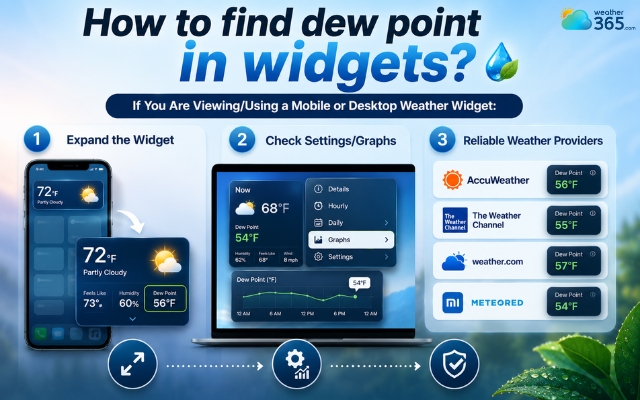
Look for the dew point widget in the settings
2. If You Are Adding a Widget to Your Website
If you want to display these advanced atmospheric parameters on your own blog, local news site, or business page, you have two primary routes:
The No-Code Route (Third-Party Plugins)
If you don't know how to code, you can use ready-made widgets like the Elfsight Weather Widget or WordPress plugins such as Location Weather.
Once installed, simply head into the plugin’s "Pro" or data display settings and toggle the "Dew Point" option to On.
If you want to display dew points on your own web pages: You must use a customizable widget that supports advanced atmospheric parameters.
Depending on your site's layout, you can pair it with broader forecast range widgets to display multi-day trends alongside real-time moisture metrics
The Developer Route (Weather APIs)
For a completely custom, tailor-made user interface, developers can fetch live data streams using a robust weather API.
The Tools: Use trusted platforms like OpenWeather API or Meteomatics.
The Process: Write a script to fetch the JSON payload from the API, isolate the dew_point variable, parse the data, and render it beautifully using your own front-end HTML, CSS, and JavaScript.
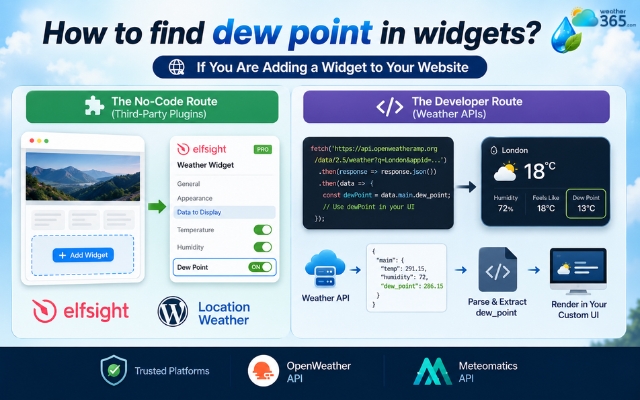
How to find dewpoint metric in widgets
Too Complicated? Check Dew Point Instantly on Weather365
If you don't want to fiddle with app settings or write code, you can get a clean, instant breakdown of current moisture levels online:
Head over to Weather365.com.
Type your city into the search bar.
Scroll down to the Humidity section - your real-time dew point reading and comfort index will be displayed right below it.
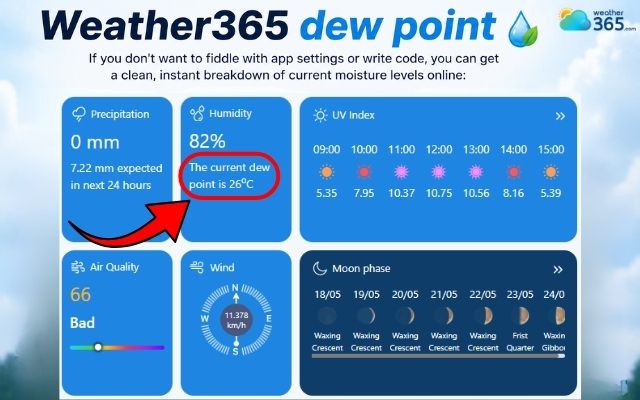
Check the dew point on Weather365
Sum up
A dew point widget is the ultimate tool for anyone looking to truly understand the weather. By moving past deceptive relative humidity percentages, it gives you a clear, absolute metric of atmospheric comfort. Whether you use it via a quick glance at your smartphone, embed it onto your business website, or pull it up on Weather365, tracking the dew point ensures you will never be caught off guard by a sticky, muggy day again.
Frequently Asked Questions (FAQs)
Related post
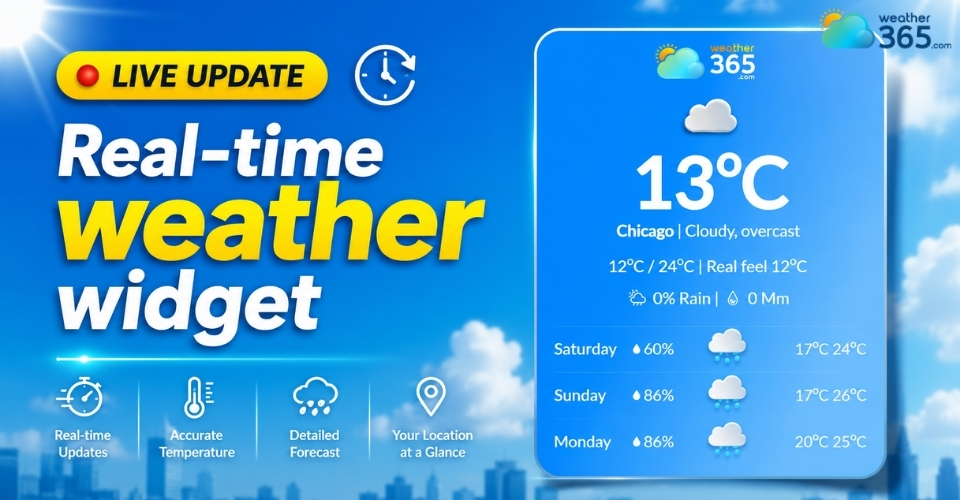
Real-time Weather Widget: Definition, Features, and Setup
 217
217
 0
0
 5.0
5.0
 19/05/2026
Current Weather Widget: Add The Best Live Weather for Your Website
197
0
4.8
13/08/2026
Weekend Weather Widget: The Ultimate Tool For Smart Event Planning
127
0
4.9
29/06/2026

0 Comment
Leave a comment
Your email address will not be published. Required fields are marked *