




Tomorrow.io widget vs Weather365 widget: Choosing the Best Weather Tool


Not every weather widget serves the same purpose. Some are built for enterprises that need hyper-detailed forecasting, while others are made for website owners who simply want a clean, attractive, and reliable forecast display. In this Tomorrow.io widget vs Weather365 widget comparison, we’ll break down both tools side by side so you can quickly see which one fits your goals.
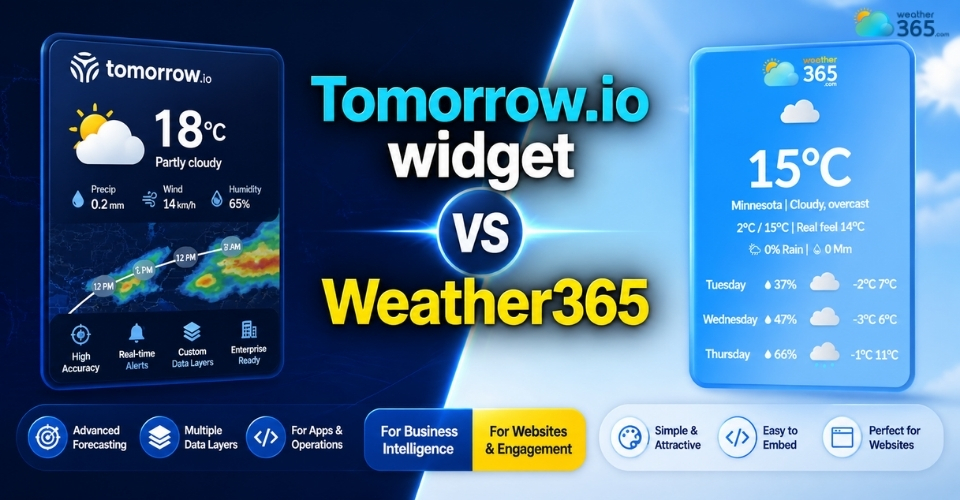
Tomorrow.io widget vs Weather365 widget
- Overview of Weather365 widget
- Overview of Tomorrow.io widget
- Tomorrow.io widget vs Weather365 widget: Detailed Comparison
- Hyperlocal Precision vs. Standard City Data
- Data Layers and Advanced Metrics
- UI/UX and Customization Options
- Ease of Installation
- Mobile Responsiveness and Loading Speeds
- API Availability for Developers
- Pricing & Accessibility
- Which widget should you choose?
- Pros and Cons
- Tomorrow.io widget vs Weather365 widget: When to Choose?
Overview of Weather365 widget
If you need a weather widget that is simple, attractive, and easy to install, Weather365 widget is one of the most beginner-friendly options available.
It is designed mainly for website owners who want to display local weather information without dealing with complex APIs or technical setup.
Unlike enterprise weather platforms that focus on advanced forecasting systems, Weather365 widget keeps things practical.
Its main goal is to help websites add useful weather information quickly while also improving the page’s visual appeal and user experience.
Key features of Weather365 widget:
Easy no-code embed installation
Multiple widget styles and layout options
Customizable colors, size, and language
Responsive design for desktop and mobile
Displays essential weather data like temperature, conditions, humidity, and forecast
Fast loading and lightweight performance
Free and accessible for most website owners
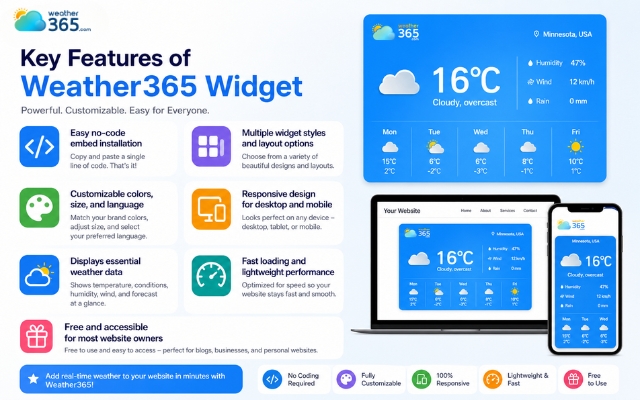
Unique features of the Weather365 widget
Another reason many users like Weather365 widget is that it does not overload visitors with too much technical weather information.
Instead, it focuses on the data people commonly check every day, making the widget feel clean, readable, and useful.
Overall, Weather365 widget is a practical choice for blogs, travel websites, local business pages, and any platform that wants a quick weather display solution without coding complications.
Overview of Tomorrow.io widget
Compared with simple website weather widgets, Tomorrow.io widget is built as a more data-driven and advanced forecasting solution.
While it still offers free embeddable widgets, the platform comes from a much larger weather intelligence ecosystem powered by AI forecasting models, satellite data, and hyperlocal weather monitoring.
This means Tomorrow.io widget is not just trying to show visitors today’s temperature.
It is designed to provide richer weather insights, more forecast layers, and stronger real-time accuracy for users who need more than a standard city forecast.
Key features of Tomorrow.io widget:
Free embeddable widget with responsive design
Supports 30+ languages
Multiple widget formats including forecast, air quality, pollen, and fire risk
Hyperlocal weather updates with higher forecast precision
Dynamic location detection based on user IP
Powered by Tomorrow.io Weather API and AI forecasting engine
Suitable for both websites and developer integrations
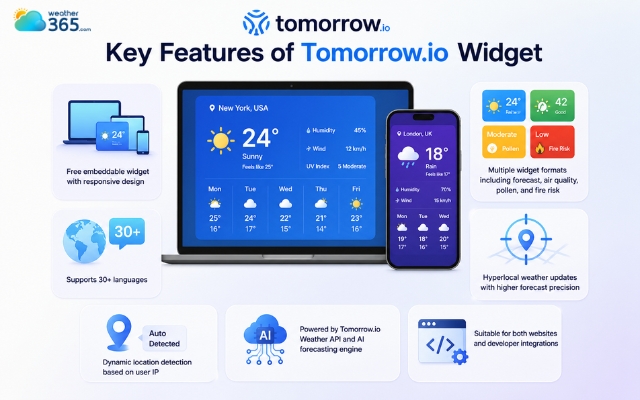
Tomorrow.io is an advanced forecasting solution
One thing that makes Tomorrow.io widget different is the amount of weather data it can surface.
Instead of only showing basic sunny/rainy conditions, it can also display air pollution, allergens, severe weather indicators, and multi-location monitoring.
That gives it a more professional feel, especially for industries or websites where weather has a direct impact on planning.
However, because Tomorrow.io widget comes from an enterprise weather technology background, the widget feels slightly more technical than plug-and-play solutions.
It offers more power, but it is clearly designed for users who value forecasting depth over simple visual convenience.
Tomorrow.io widget vs Weather365 widget: Detailed Comparison
Although both tools help websites display weather information, Tomorrow.io and Weather365 widget are designed with very different goals in mind.
Tomorrow.io widget focuses more on forecast intelligence and developer functionality, while Weather365 widget is built for quick website integration and visitor-friendly display.
Let’s look at the main differences.
Hyperlocal Precision vs. Standard City Data
Tomorrow.io widget is known for its hyperlocal forecasting.
By using AI models and multiple weather data sources, it can provide more precise updates for smaller areas instead of only general city forecasts.
Weather365 widget offers more standard city-based weather information such as current temperature, humidity, and daily forecast.
For normal website use, this is often enough, but it is not as data-deep as Tomorrow.io widget.
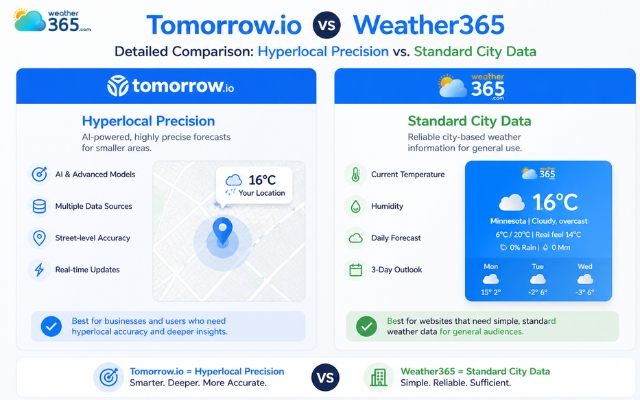
Weather365 widget offers more standard city-based weather
Data Layers and Advanced Metrics
Tomorrow.io widget supports richer environmental information, including:
air quality
pollen levels
precipitation intensity
severe weather alerts
Weather365 widget mainly displays the essential weather details visitors usually need:
temperature
weather conditions
humidity
short forecast
So, Tomorrow.io widget gives more analysis, while Weather365 widget keeps the information simple and clean.
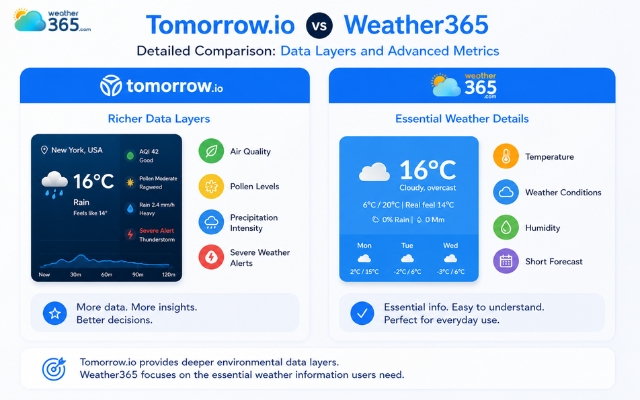
Tomorrow.io widget supports richer environmental information
UI/UX and Customization Options
Weather365 widget has a stronger website-friendly design.
It offers ready-made layouts, customizable colors, and a clean visual style that fits naturally into blogs or business websites.
Tomorrow.io widget also looks modern, but its widget feels more functional than decorative. It focuses more on data delivery than visual flexibility.
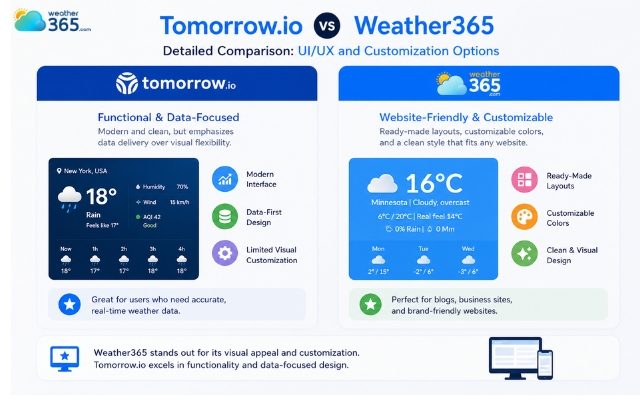
Weather365 widget has a stronger website-friendly design
Ease of Installation
Weather365 widget is easier for beginners.
Users can simply customize the widget, copy the embed code, and place it on their site within minutes.
Tomorrow.io widget also offers embeddable widgets, but because it is connected to a broader API platform, the setup can feel slightly more technical for users who want advanced features.
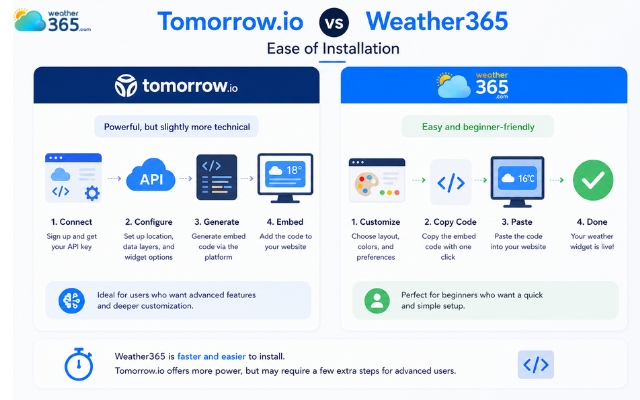
Weather365 widget is easier for beginners
Mobile Responsiveness and Loading Speeds
Both widgets are mobile responsive, but Weather365 widget tends to feel lighter because it only displays core weather information.
Tomorrow.io widget may handle more live data and weather layers, so it can feel a bit heavier depending on the widget type used.
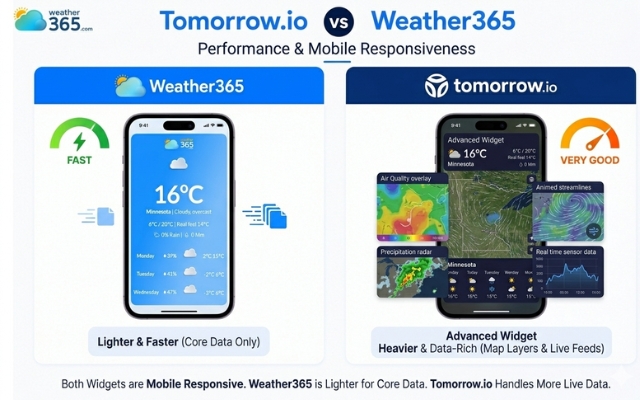
Weather365 widget tends to feel lighter
API Availability for Developers
This is where Tomorrow.io widget clearly wins.
Besides widgets, Tomorrow.io widget offers a full weather API system with scalable integrations for apps, dashboards, and enterprise tools.
If your business needs deeper monitoring beyond simple forecast displays, our comparison of Weather Widgets vs Weather Dashboards can help you understand when a standard widget is no longer enough.
Weather365 widget is mainly a visual weather widget solution, not a developer-focused weather platform.
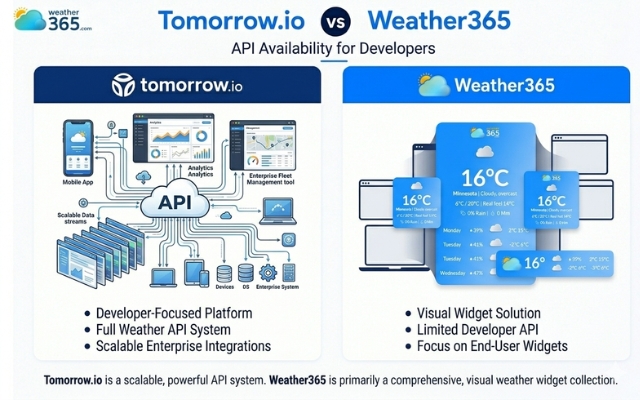
Weather365 widget is mainly a visual weather widget solution
Pricing & Accessibility
Tomorrow.io widget offers free widgets and limited free API usage, but many advanced tools are locked behind tiered paid plans.
Weather365 widget is more accessible for general users because it is largely free and easy to use without pricing complexity.
Feature | Tomorrow.io Widget | Weather365 widget |
Data Source | AI & Proprietary Satellites | Traditional Meteorological Models |
Update Frequency | Every 1–15 minutes | Hourly/Daily |
Best For | Business, Logistics, & High-Tech | Personal Blogs & Basic Portals |
AQI & Pollen | Yes (Detailed) | Basic / Limited |
Responsive Design | Fully Responsive | Standard Fixed/Fluid |
Which widget should you choose?
After comparing Tomorrow.io widget vs Weather365 widget in detail, the truth is this: neither widget is universally “better.”
They are simply built for different users. One focuses on advanced weather intelligence and scalable integrations, while the other focuses on simplicity, fast setup, and website friendliness.
So the right choice really depends on what you expect your weather widget to do.
Pros and Cons
Before deciding, it helps to look at the practical strengths and weaknesses of each tool.
Tomorrow.io widget
Pros:
Delivers more advanced weather layers such as air quality, pollen, and risk indicators
Built on a strong weather API system for developers and businesses
Better hyperlocal forecasting precision
Scalable for apps, enterprise dashboards, and custom integrations
Cons:
Setup can feel more technical than standard embed widgets
Some advanced capabilities depend on API usage and paid plans
Not the easiest choice for beginners who only want a simple website display
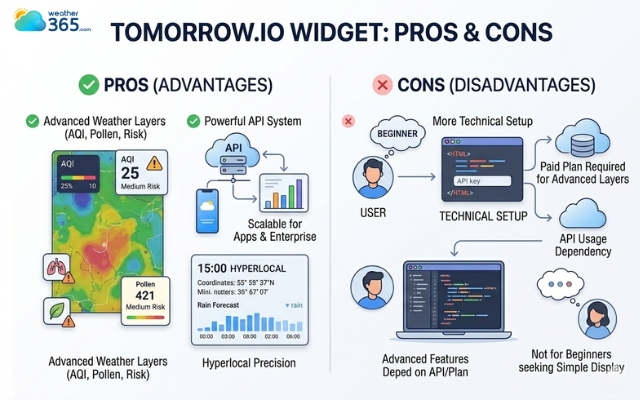
Pros and cons of using Tomorrow.io widget
Weather365 widget
Pros:
Very easy to install with simple embed code
Fast setup with no developer knowledge needed
Highly customizable in terms of style, size, and language
Lightweight and visually clean for regular websites
Free and accessible for most website owners
Cons:
Focuses mainly on standard forecast display
Does not offer the same depth of enterprise weather analytics
Less suitable for large custom weather systems or app development
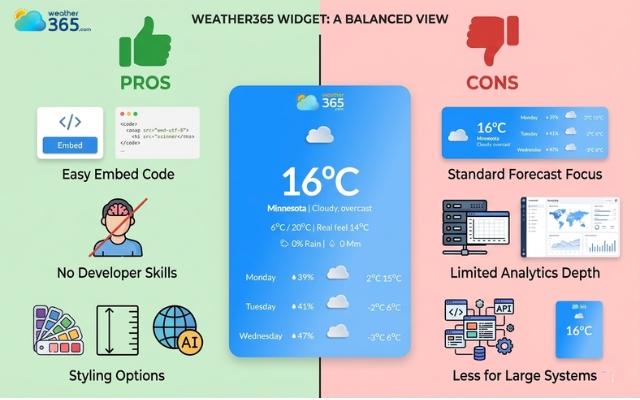
Pros and cons of using the Weather365 widget
Tomorrow.io widget vs Weather365 widget: When to Choose?
Now the bigger question: which one actually fits your needs?
When to Choose Tomorrow.io?
Tomorrow.io widget makes more sense if you are a developer, a business team, or an enterprise user that needs weather data to do more than just inform visitors.
Because the platform is connected to a scalable API ecosystem with many environmental data layers, it works better for custom apps, logistics systems, weather-sensitive operations, and advanced monitoring tools.
In simple words, choose Tomorrow.io widget when weather data is part of your business decision-making process.

Choosing Tomorrow.io widget if you are a developer
When to Choose Weather365?
Weather365 widget is the smarter option if your goal is simply to place a useful and attractive weather widget on a website.
In fact, it is often listed among the options website owners consider when searching for the best weather widget for website performance and customization.
Blogs, travel pages, hotel sites, ecommerce stores, and local business websites usually do not need enterprise-level forecasting; they just need visitors to check today’s weather in a clean format quickly.
This is also why many website owners prefer embedded widgets over standalone mobile tools, as discussed in our guide on Weather Widgets vs Weather Apps.
Since Weather365 widget requires less setup effort and feels more plug-and-play, it is ideal for users who want quick deployment without technical complications.
So if you want a widget for engagement rather than a weather intelligence system, Weather365 widget is usually the better fit.
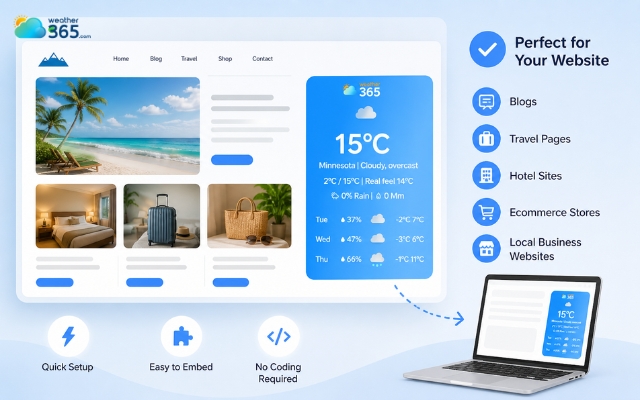
Weather365 widget is ideal for users who want quick deployment
Sum up
So which is more suitable for your needs: Tomorrow.io widget vs Weather365 widget? If you need advanced forecasting data, developer APIs, and scalable weather intelligence, Tomorrow.io widget is the stronger choice. But if you want a simple, customizable, and fast-loading widget for everyday website use, Weather365 widget is the more practical and user-friendly solution.
Frequently Asked Questions (FAQs)
Related post
Weatherwidget.io vs Weather365: Pros, Cons & Best Use Cases
 333
333
 0
0
 4.8
4.8
 05/05/2026
OpenWeatherMap Widget vs Weather365: Which One Fits Your Website Better?
222
0
5.0
17/08/2026
Weather Widgets vs Weather APIs: A Comprehensive Comparison
190
0
4.8
05/05/2026

0 Comment
Leave a comment
Your email address will not be published. Required fields are marked *