




Weather Widget for Agriculture: Embed a Live Farming Track in Seconds


Weather changes can quickly affect farming decisions, which is why a smart weather widget for agriculture is so useful. It helps farmers track local weather conditions in real time, plan field work more accurately, reduce wasted resources, and protect crops from sudden weather risks. Let’s learn how it works and add one today!
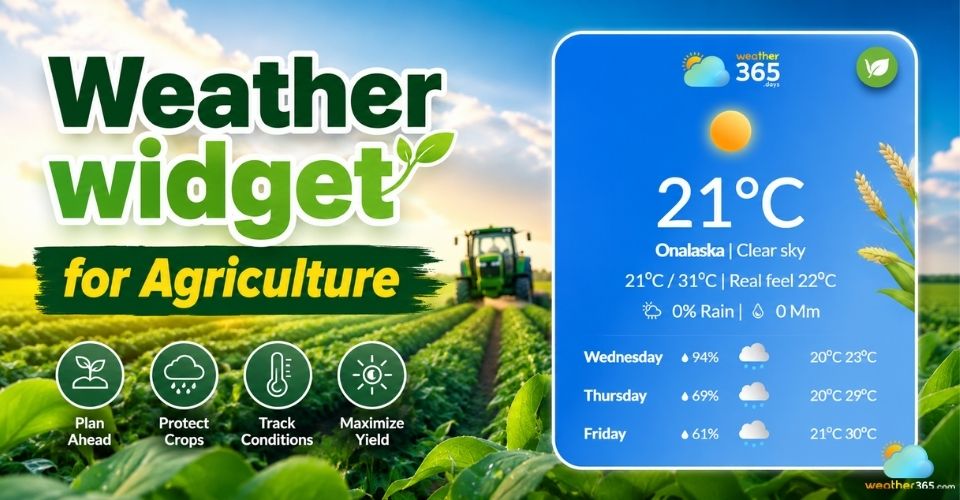
Weather widget for agriculture
- Why Traditional Weather Outlets Fail Modern Farming
- Who Should Embed a Weather Widget for Agriculture?
- Farm Management Software (FMS)
- Agricultural Co-ops & Supply Portals
- Agribusiness E-Commerce Websites
- Core Features of Our Agricultural Weather Widget
- Why use the Weather365 widget for Agriculture websites?
- Add a Weather Widget for Agriculture: 3 Simple Steps
Why Traditional Weather Outlets Fail Modern Farming
Traditional weather apps are often too general for farming. Most forecasts are based on city-center data, while farms need hyper-local weather information that reflects actual field conditions.
The weather can vary a lot even within short distances. A nearby town may show light rain, but a farm field could stay completely dry or face stronger winds.
For farmers, small weather changes directly affect planting, spraying, irrigation, and harvesting decisions.
That’s why a weather widget for agriculture is much more useful than a standard weather app.
Instead of only showing temperature or rain forecasts, it can also track important farming metrics like soil moisture, frost risk, spraying conditions, and field trafficability.
More accurate weather data also helps reduce operational costs.
Farmers can avoid spraying before rainfall, prevent fuel waste from unnecessary machinery use, and choose safer times for sowing or fertilizer application.
In modern farming, better weather tracking means fewer mistakes, lower waste, and more efficient daily operations.
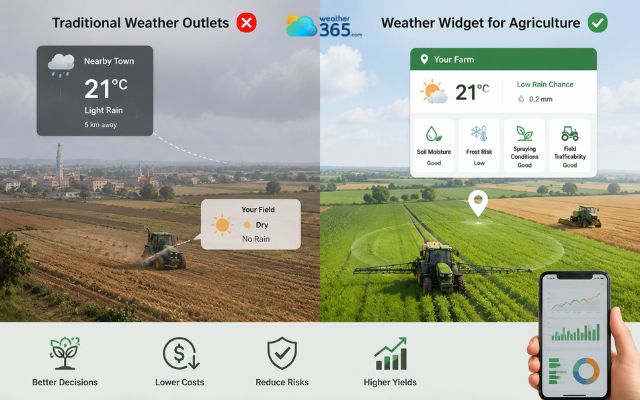
Traditional weather apps are often too general for farming
Who Should Embed a Weather Widget for Agriculture?
In general, any agriculture-related platform that depends on weather-based decisions can benefit from a weather Widget for agriculture.
From farm management tools to agribusiness websites, real-time weather data helps users make faster and more accurate decisions every day.
In fact, tailored weather data is becoming essential across many sectors, and you can explore various weather widgets by industry to see how different fields utilize these tools.
Farm Management Software (FMS)
Farm Management Software platforms can use a built-in weather module to improve daily field planning.
Instead of checking separate weather apps, farmers can view forecasts, soil conditions, and field activity data in one place.
This makes it easier to plan:
Spraying schedules
Irrigation timing
Planting windows
Harvest operations
A weather-integrated dashboard also keeps field logs more organized and useful.
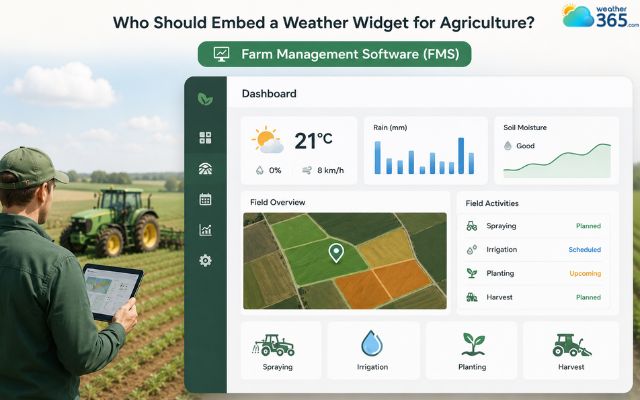
A weather widget can improve daily field planning
Agricultural Co-ops & Supply Portals
Agricultural co-ops and supply platforms can use weather widgets to keep members engaged longer. Farmers often check weather conditions before buying fertilizer, seeds, or crop protection products.
By displaying live local forecasts directly on the platform, co-ops can help members decide when to apply inputs or when to prepare for rain or frost.
This creates a more helpful and interactive user experience.
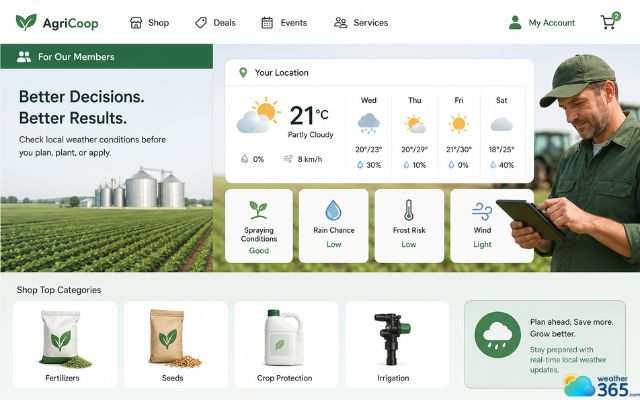
A weather widget boosts interactive user experience
Agribusiness E-Commerce Websites
Weather data can also improve online agricultural stores.
A smart weather widget for agriculture allows e-commerce platforms to show more relevant product recommendations based on upcoming regional weather conditions.
For example, heat forecasts may increase demand for irrigation tools, while heavy rain alerts may encourage farmers to buy drainage or crop protection products.
This makes the shopping experience feel more practical and personalized for growers.
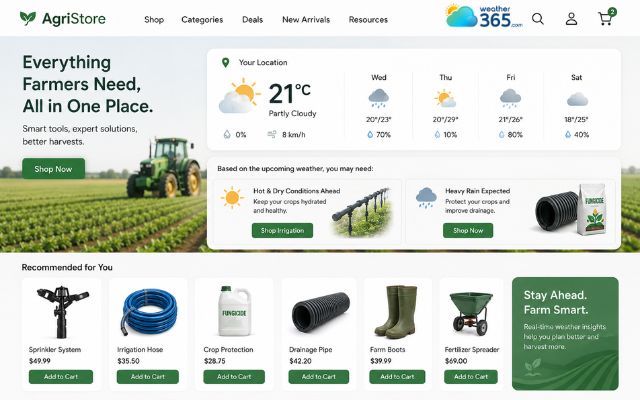
Weather data can improve online agricultural stores
Core Features of Our Agricultural Weather Widget
A great weather widget for agriculture should help farmers make smarter daily decisions with real-time, field-level weather insights.
Actionable Operational Windows (Spraying & Sowing)
Timing is one of the biggest challenges in farming. The widget analyzes conditions like wind speed, rainfall probability, and soil stability to help farmers know when it is safe to spray crops or sow seeds.
For example, spraying during strong winds can cause chemical drift, while planting before heavy rain may damage seed placement. With live operational windows, growers can reduce waste, protect crops, and improve field efficiency.
Real-Time Crop Risk & Disease Assessments
Weather conditions often affect crop health before visible signs appear.
That’s why the widget includes automated risk monitoring for issues like frost damage, heat stress, excess humidity or common crop diseases.
These alerts help farmers respond earlier and reduce the chance of large-scale crop losses during extreme weather conditions.
Deep Soil Insights (Temperature & Moisture Tracking)
Soil conditions are just as important as air temperature in agriculture.
The widget tracks soil moisture and root-zone temperature to help farmers understand whether fields are ready for machinery or planting.
This is especially useful after rainfall.
Driving heavy equipment on overly wet soil can compact the ground, damage soil structure, and affect future crop growth.
This is similar to the ground safety challenges managed via a weather widget for construction. Better soil tracking helps avoid unnecessary field damage.
Hyper-Local Precipitation Radar & Extreme Alerts
Weather can change quickly during the farming season.
Hyper-local radar tracking allows farmers to monitor nearby storms, sudden rainfall, strong winds, or temperature drops in real time.
The widget can also support instant alerts, helping growers prepare faster for unexpected weather changes.
This improves safety and helps protect both crops and equipment from severe conditions.
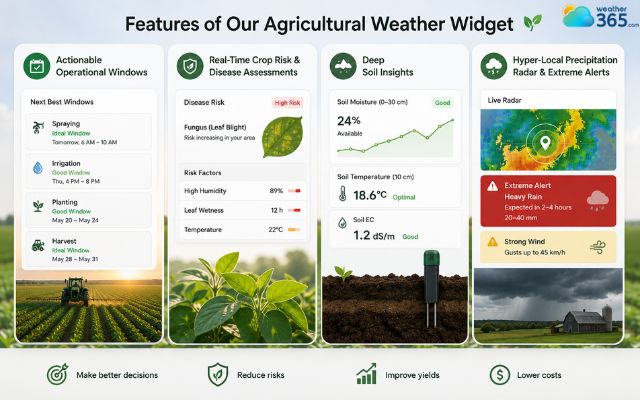
Features included in a weather widget for agriculture
Why use the Weather365 widget for Agriculture websites?
The Weather365 widget helps agriculture websites provide more useful and practical weather insights for farmers and agribusiness users.
It combines easy integration with real-time farming data, making it a strong solution for modern agricultural platforms.
No-Code & Developer-Friendly
Weather365 is designed to be simple to install, even for non-technical users.
Website owners can quickly generate embed code and add the widget to farm dashboards, agricultural portals, or CMS platforms without a complicated setup process.
At the same time, developers still have flexibility to customize layouts and integrate the widget into larger farming systems or agribusiness platforms.
Precision Agriculture & Data
Unlike basic weather apps, Weather365 focuses on local weather conditions that are more useful for farming operations.
This gap in standard forecasting is why commercial growers need a dedicated Weather Widget for Business.
With precision data, farmers can monitor important details like rainfall patterns, wind conditions, frost risk, and soil-related data in real time.
This helps growers make better decisions about spraying, irrigation, planting, and harvesting while reducing weather-related mistakes during the season.
Business ROI & Engagement
A live weather feature naturally keeps users returning to a website more often.
Farmers regularly check forecasts before making field decisions, which can increase session time and improve overall platform engagement.
For agribusiness websites, weather-based content also creates opportunities to recommend products or services that match upcoming farming conditions, making the platform feel more helpful and relevant.
Global Accessibility
Weather365 works smoothly across desktops, tablets, and mobile devices, making it accessible for users in different regions and farming environments.
Whether the audience includes local growers or international agricultural businesses, the widget can adapt to multiple climates and locations without difficulty.
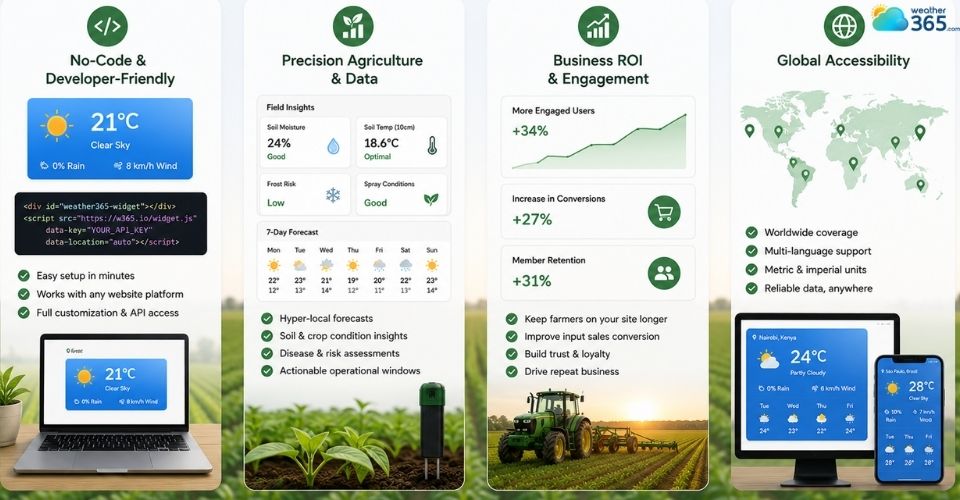
Use Weather365 widget for agriculture websites
Add a Weather Widget for Agriculture: 3 Simple Steps
Setting up a weather widget for agriculture is fast and simple.
You can add live farming weather data to your website or dashboard in just a few minutes without needing advanced technical skills.
Step 1: Generate Your Code
Start by choosing your target farming location in the widget builder. You can customize the layout, display size, and weather modules based on your website needs.
This allows agricultural platforms to show more relevant local weather conditions for specific farming regions or crop zones.
Step 2: Copy the Embed Token
After customizing the widget, simply copy the generated embed code. Most providers offer lightweight HTML iframe or JavaScript snippets that work smoothly across modern websites.
The responsive design also helps the widget display properly on desktops, tablets, and mobile devices.
Step 3: Paste and Go Live
Paste the code into your farming portal, CMS, agribusiness website, or management dashboard.
Once added, the weather widget will automatically display live weather updates and real-time agricultural conditions.
No meteorological knowledge or complex setup process is required, making it easy for both developers and non-technical users to launch quickly.
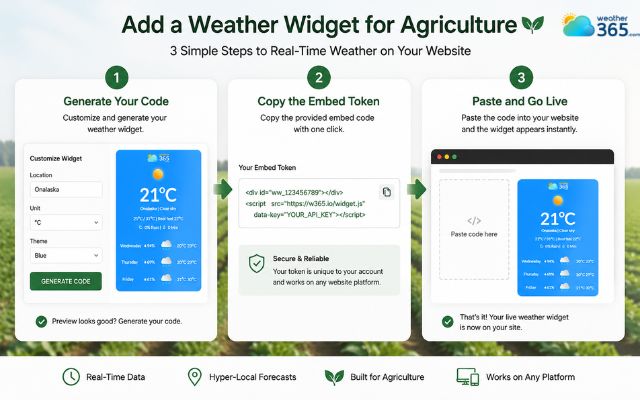
Adding a weather widget for agriculture website with ease
Sum up
With a modern weather widget for agriculture, farming platforms can offer more than basic forecasts. Real-time weather tracking, soil monitoring, and operational alerts help farmers stay prepared for changing conditions and make smarter choices during every stage of the growing season.
Frequently Asked Questions (FAQs)
◉ Step 1: Choosing a weather widget provider
◉ Step 2: Customizing the widget layout
◉ Step 3: Copying the generated embed code
◉ Step 4: Pasting the code into your website or dashboard
Most modern weather widgets support iframe or JavaScript integration and require no advanced coding knowledge.
Related post
Weather Widget for Business: Enhance Your Website with a Live Weather
 129
129
 8
8
 4.7
4.7
 02/06/2026
Weather Widget for Outdoor Business: Free Live Forecasts for Your Site
115
8
5.0
02/06/2026
Weather Widget for Education Website: Smart Solution for Schools
111
8
4.8
02/06/2026

8 Comment
Anna Patterson
Our agricultural supply business serves farmers in several districts. Would it make sense to display weather information for different areas?
weather365
Yes! Weather conditions can vary between districts, so location-specific forecasts may be more useful than a single general forecast. Check whether your chosen widget supports multiple locations.
Ophelia Morales
I manage an orchard, and frost is one of my biggest concerns during certain months. Can a weather widget help us prepare?
weather365
It can provide useful temperature forecasts to help you monitor potential cold conditions. For frost-sensitive crops, combine the forecast with local alerts and on-site temperature measurements before taking protective action.
Alexandra Cook
Would a weather widget be useful for small farms growing vegetables? Heavy rain and sudden temperature changes can damage crops.
weather365
Definitely! A local forecast can help growers prepare for changing conditions and plan activities such as harvesting, covering sensitive plants, or improving field drainage.
Sage Bailey
Rainfall forecasts are really important for our farm. We sometimes delay irrigation when rain is expected, so having weather information on our website would be helpful.
weather365
Absolutely! Local forecasts can help farmers plan irrigation more efficiently and avoid unnecessary watering when rain is likely. Actual rainfall may vary, so it's still important to monitor field conditions.
Leave a comment
Your email address will not be published. Required fields are marked *