




Weather Widget GDPR Compliance: Essential Requirements Explained


Have you ever thought that a simple weather widget could put your website at risk of violating GDPR? It might seem harmless, but many widgets quietly collect user data behind the scenes. In this post, we’ll break down weather widget GDPR compliance in a simple way so you can protect user privacy and avoid unnecessary legal risks.
Weather widget GDPR compliance
- What Is GDPR and Why It Affects Weather Widgets
- Why do weather widgets collect data?
- Types of data collected by Weather widgets
- How Third-Party Weather Providers Process Data?
- Key Requirements for Weather Widget GDPR Compliance
- Common GDPR issues
- How GDPR Compliance Affects Weather Widget Functionality
- How To Make Your Weather Widget GDPR Compliant
- Reliable weather widget GDPR compliance for website
What Is GDPR and Why It Affects Weather Widgets
The General Data Protection Regulation (GDPR) is a privacy law created by the European Union to protect people’s personal data.
It applies to any website that collects or processes data from users in the EU, no matter where the website itself is based.
In simple terms, GDPR gives users more control over their data. It requires websites to:
Clearly explain what data they collect
Ask for permission before collecting it
Only collect what is truly necessary
Keep data secure and avoid misuse
If your website has visitors from Europe, even occasionally, GDPR is something you can’t ignore.
Why do weather widgets collect data?
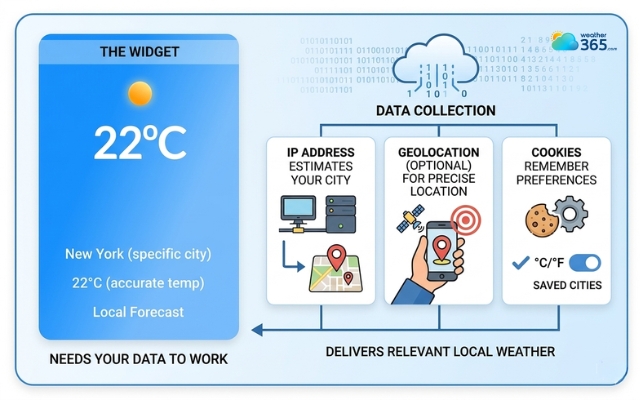
A weather widget needs a small amount of user data to function properly.
It doesn’t automatically know where a visitor is, so it typically uses the IP address to estimate location.
In some cases, it may request access to geolocation for more accurate results. It can also store cookies to remember user preferences, such as units or saved locations.
Without this data, the widget wouldn’t be able to deliver relevant, location-based weather information.
A weather widget needs a small amount of user data to function
Types of data collected by Weather widgets
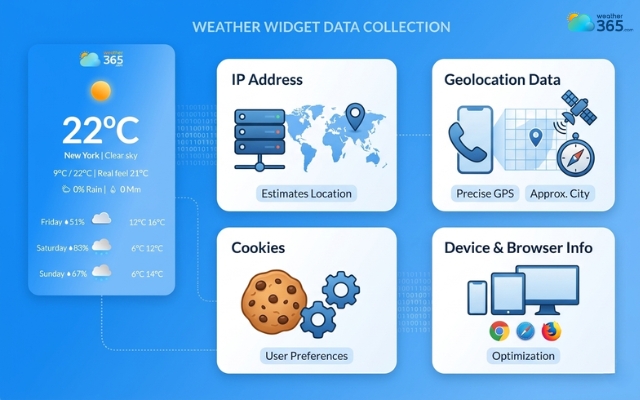
To understand the compliance risk, let’s break down the most common types of data involved:
IP Address: Used to estimate where the user is located. Under GDPR, this is considered personal data.
Geolocation Data: This can range from approximate (city-level) to precise (GPS-based), depending on permissions.
Cookies: These store user preferences and sometimes track behavior across sessions.
Device & Browser Information: Includes things like browser type, operating system, and screen size, often used for optimization but still part of user profiling.
Even if each piece of data seems minor, together they can identify or track a user, which makes them subject to GDPR rules.
Most common types of data involved
How Third-Party Weather Providers Process Data?
Most websites don’t build their own weather systems, they rely on third-party providers. This adds another layer of complexity.
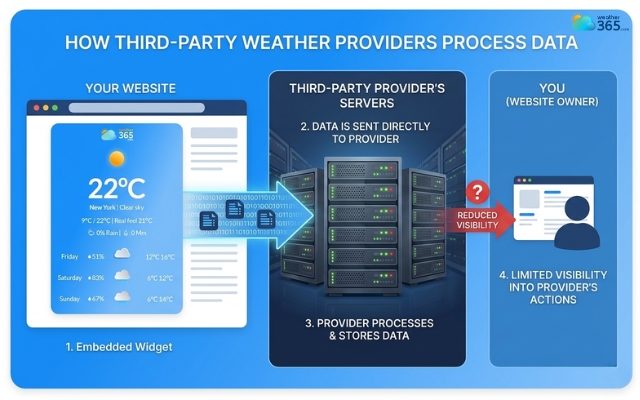
When you embed a weather widget:
Data is often sent from the user’s browser directly to the provider’s servers
The provider may process, store, or even analyze that data
You (as the website owner) may not have full visibility into what happens next
This creates a shared responsibility.
Under GDPR, you are still accountable for the tools you use, even if the data processing happens externally.
That’s why choosing a trustworthy, privacy-focused provider is critical.
Most websites rely on third-party providers
Key Requirements for Weather Widget GDPR Compliance
What actually makes a weather widget GDPR compliance? Let’s investigate with us!
No personal data collection
The safest approach is to avoid collecting personal data whenever possible.
Some weather widgets are designed to work without tracking users at all, using manual location input instead of automatic detection.
The less personal data involved, the lower your compliance risk.
No unnecessary data retention
Even if data is collected, it shouldn’t be stored longer than needed. GDPR emphasizes “data minimization,” which means only keeping data for a clear purpose, and deleting it afterward.
A good weather widget should not store user data indefinitely.
Cookie consent
This is one of the most important requirements.
If your widget uses cookies or third-party scripts, you must ask for user consent before loading them. Without consent, the widget should remain inactive.
This is why many sites use a Consent Management Platform (CMP) to control when scripts are allowed to run.
Privacy policies
Transparency is key. Your privacy policy should clearly explain that you are using a weather widget, what data it may collect, and how that data is processed.
Users shouldn’t have to guess what’s happening behind the scenes.
Location data protection
Location data is sensitive, even when it’s only approximate. You should never access or use it without permission.
In practice, this means asking users before enabling location-based features and giving them the option to decline.
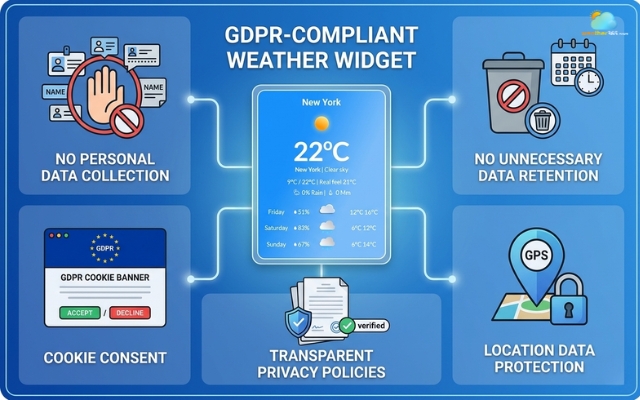
Criteria for a weather widget GDPR compliance
Common GDPR issues
Even if you’ve added a weather widget with good intentions, things can still go wrong at the technical level.
Here are some of the most common issues website owners run into:
Scripts blocked before consent
Many websites use a Consent Management Platform (CMP) to block third-party scripts until users give permission.
The problem is, if your weather widget relies on those scripts, it may not load at all before consent is granted.
This can lead to empty spaces on your page or broken layouts. While this is technically compliant, it can hurt user experience if not handled properly.
That’s why it’s important to use widgets that support delayed loading or fallback content.
Cookies restricted
Cookies are often limited or completely blocked until users accept them.
If your weather widget depends on cookies to store location or preferences, it may stop working correctly.
For example, the widget might reset every time the page reloads or fail to remember the user’s chosen location.
Incorrect CMP setup
This is one of the biggest and most overlooked issues.
If your CMP is not configured correctly, scripts might run before user consent is given, putting you at risk of GDPR violations.
On the flip side, an overly strict setup can block everything, including essential scripts, making your widget unusable.
Finding the right balance is key: scripts should only run after consent, but also integrate smoothly once permission is granted.
Incorrect CMP setup is one of the most common mistakes, especially when users don’t properly configure how third-party tools are loaded.
Learn how to configure properly from our guide on how to add weather widget to website!
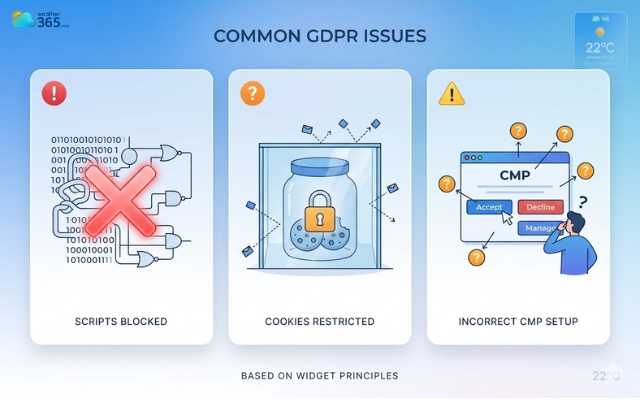
Some common issues website owners run into
How GDPR Compliance Affects Weather Widget Functionality
When you start applying consent rules and data restrictions, the widget may not function the same way it did before.
Let’s look at the most common impacts.
Widget not loading
One of the most noticeable effects is that the widget may not load at all. This usually happens when your Consent Management Platform blocks third-party scripts until the user gives permission.
If the weather widget depends on those scripts, it simply won’t appear on the page until consent is granted.
While this keeps you compliant, it can leave empty spaces or reduce the usefulness of your layout if not handled properly.
Location not detected
Another common issue is inaccurate or missing location data. Since GDPR requires user permission before accessing personal data, your widget can’t automatically detect location without consent.
As a result, users might see generic weather information or be asked to manually enter their location. This adds friction to the experience, especially if users expect instant, personalized results.
Delayed rendering
Even when everything is set up correctly, GDPR compliance can still introduce delays. The widget often has to wait until the user interacts with the cookie banner before it can fully load.
This means the weather information may appear a few seconds later than the rest of your page.
If not optimized, this delay can affect perceived performance and user engagement.
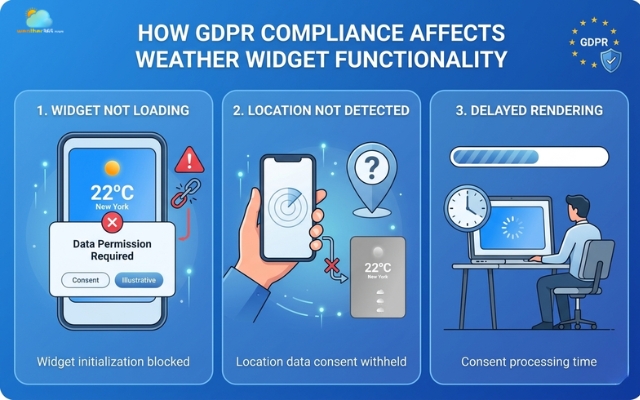
The widget may not function the same way it did before
How To Make Your Weather Widget GDPR Compliant
You might be worry that your weather widget is not compliant! You’re not alone! We’ve got you covered!
Just applying a few smart practices that balance privacy and functionality.
Implement data minimization
Start by limiting the amount of data your widget collects.
If precise location isn’t necessary, use approximate location or let users enter it manually. The idea is simple: only collect what you truly need, nothing more.
Obtain explicit consent
Before any data is collected or any third-party script runs, you need clear user consent.
This is usually handled through a cookie banner or CMP. The widget should only load after the user agrees; otherwise, you risk non-compliance.
When using platforms like WordPress, you can easily integrate consent workflows while setting up widgets through guides How to add weather widget to WordPress, ensuring the widget only loads after user approval.
Prioritize privacy-focused providers
Not all weather widget providers are the same. Some rely heavily on tracking, while others are built with privacy in mind.
Choosing a provider that minimizes data collection makes compliance much easier from the start.
Use data protection technologies
You can also reduce risk by using technical solutions like API proxying, server-side rendering, or IP anonymization.
These methods help limit how much user data is exposed to third parties while still delivering accurate weather information.
You can also reduce risk by using technical solutions like API proxying, server-side rendering, or embedding methods like how to embed weather widget in HTML.
This helps to limit how much user data is exposed to third parties while still delivering accurate weather information.
Update your privacy policy
Finally, make sure your privacy policy reflects what’s actually happening on your site. Clearly explain that you use a weather widget, what data it may collect, and how that data is handled.
Transparency is a key part of GDPR compliance.
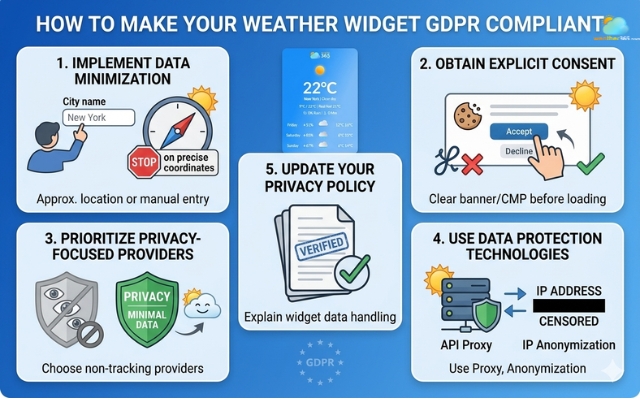
Practices to make your weather widget compliant
Reliable weather widget GDPR compliance for website
By now, you understand the rules, but choosing the right weather widget is what really determines whether your site stays compliant in the long run.
Not all widgets are built with privacy in mind, so instead of fixing issues later, it’s smarter to start with a solution that already aligns with GDPR principles.
A reliable widget is about how it handles user data behind the scenes.
Here are the key criteria you should look for:
Privacy-first design
Minimal weather widget
Privacy friendly weather
To make things easier, here are three weather widgets that align well with GDPR principles and are commonly considered privacy-friendly:
Weather365
Weather365 is a strong choice if you want a balance between usability and compliance. It focuses on minimal tracking, simple integration, and works well with consent management platforms.
This makes it ideal for websites that need a quick, low-risk setup without complex customization.
Meteo Weather Widget
This widget is designed with strict privacy in mind. It only uses location data when permission is granted and does not store or share personal data with third parties. That makes it a solid option for GDPR-sensitive websites.
Privacy Friendly Weather
Developed with a privacy-first approach, this tool avoids trackers and allows users to control location input manually. It’s especially useful if you want full transparency and minimal data processing.
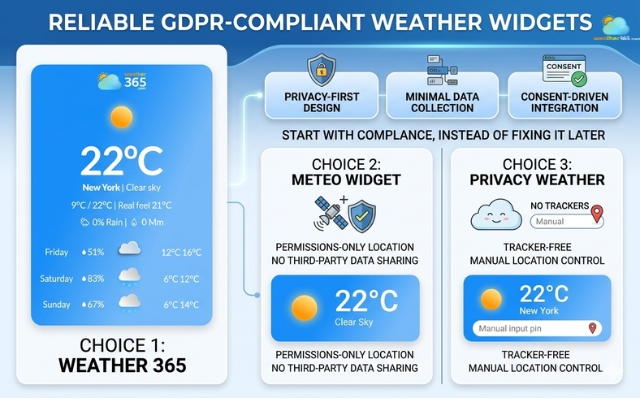
Top choices for a reliable weather widget provider
Sum up
It’s easy to overlook a weather widget, but it actually has a real impact on how user data is handled. Getting weather widget GDPR compliance right means choosing the right tools, asking for consent, and keeping data use simple. Do that well, and you’ll create a smoother, safer experience your users can actually trust.
Frequently Asked Questions (FAQs)
◉ Display a permission request for location access
◉ Integrate it with your cookie consent system
◉Only activate the widget after user approval
Related post
Weather Widget Performance Optimization Tips for Faster Websites
 228
228
 8
8
 4.8
4.8
 28/04/2026
How To Add Weather Widget To Website: Simple Embed Guide for All Platforms
221
8
4.8
17/08/2026

8 Comment
Johan Berry
Updating a privacy policy is probably easy to forget when adding a new feature to a website. I can see why it’s important to review it whenever a new third-party service is introduced.
weather365
Absolutely. The policy should reflect the data processing that actually takes place, including relevant third-party services, purposes, and sharing arrangements. A quick review during implementation can save confusion later.
Tessa Mckinney
This is something website owners should pay attention to. A widget might work perfectly during testing but stop loading when a cookie consent plugin blocks third-party scripts.
weather365
That can definitely happen. Testing the widget with different consent choices is important so you can catch loading issues and make sure the consent settings match the way the widget actually works.
Jocelyn Long
I didn’t realize IP addresses could count as personal data under GDPR. That makes me think twice about using automatic location detection without checking how it works.
weather365
Yes, IP addresses can qualify as personal data under GDPR. It’s worth checking whether a widget uses approximate location or precise GPS data and what the provider does with that information.
Genesis Parker
I never really thought about privacy when embedding a weather widget. It’s a good reminder that even small third-party tools can involve user data and deserve a closer look.
weather365
Exactly! It’s easy to focus on the features and overlook what happens behind the scenes. Checking the provider’s privacy policy before installing a widget is a sensible first step.
Copy
Leave a comment
Your email address will not be published. Required fields are marked *